






























Dietitian app: an iPhone and Android app for your clients
PlateSight's dietitian app works on your clients' phones as part of your practice. Your client photographs a meal, AI estimates the foods and calories, and they see your meal plan, their appointments and your messages in the same app. The app works on iPhone and Android and is free for your clients. Below you will find, step by step, what your client sees on their phone and how what they record reaches your panel. Installing the app and entering the invitation code takes a few minutes.
Calories from a photo
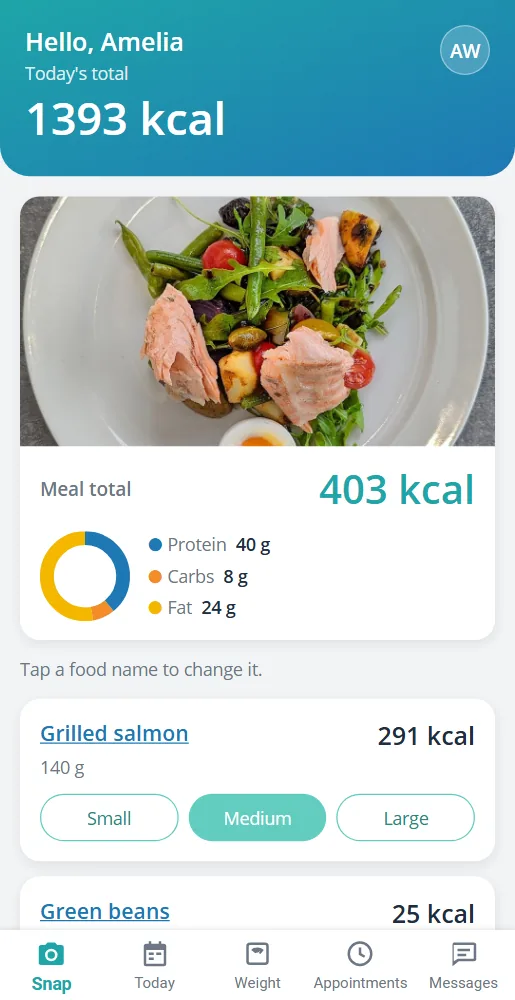
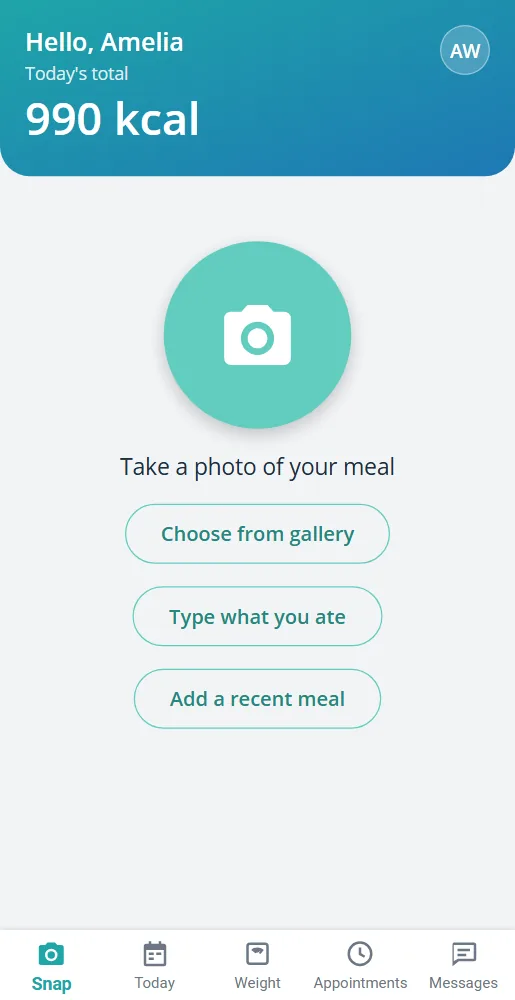
With the dietitian app, your client takes a photo of their plate or picks one from the gallery; within a few seconds the foods, portions, calories and macros appear. They tap the name of a wrongly recognised food to correct it. When they cannot take a photo, they type what they ate or add an earlier meal again with one tap. The values are AI estimates; you have the final say in the panel. The home screen has a large camera button, plus options to pick from the gallery, type a meal or add one of the recent meals, so your client finishes logging in a few taps. The result screen shows the meal's total calories and the protein, carbohydrate and fat split in a ring chart. The saved meal is added to that day's list and reaches your panel at the same moment. The portion is chosen with three buttons, small, medium and large; when the choice changes, calories and macros are recalculated. Food names are written in the client's language: if your client uses the app in English, the foods come in English; if in German, in German. Taking the photo starts inside the app; your client does not need to open a separate camera app.
- Log meals by photo, from the gallery or by typing
- Tap a food name to correct it and choose the portion
- Add a frequently eaten meal again with one tap
- Food names in the client's own language
Meals, macros and water, day by day
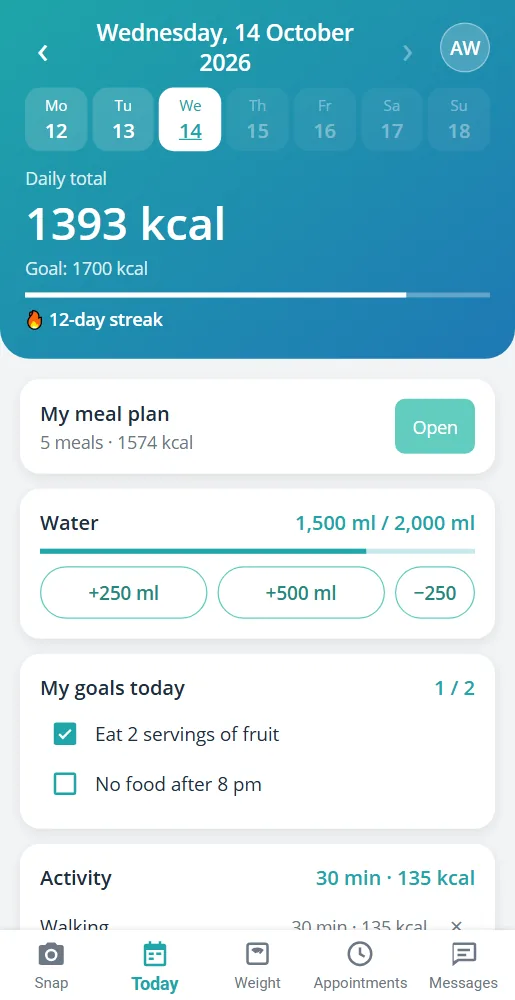
The Today screen shows the day's total, progress against the goal, the macro ring, water and activity. The client can pick an earlier day from the calendar and see that day's meals and your notes; a chart of the last 7 days and a streak counter showing how many days in a row they have logged support the habit. Meal and water reminders help, and a short nudge arrives if nothing has been logged before the day ends. Water is added in 250 or 500 ml with one tap; the habit goals you set are ticked off with a checkbox; activities such as walking are logged with their duration, and the calories burned are calculated. On the weight page the client enters their weight and sees the chart with the goal line, along with the changes in their body measurements. The client sets the reminder times themselves. A date strip at the top of the Today screen moves between the days of the week; a client who picks an earlier day can also correct that day's water and habits. If notifications are turned off on the phone, the Reminders screen shows this and takes the client to the setting where they can turn them on.
- Macro ring and last-7-days chart
- Water, habit goals and activity
- Streak counter and reminders
- Weight chart and body measurements
Plan, appointments and messages in their pocket
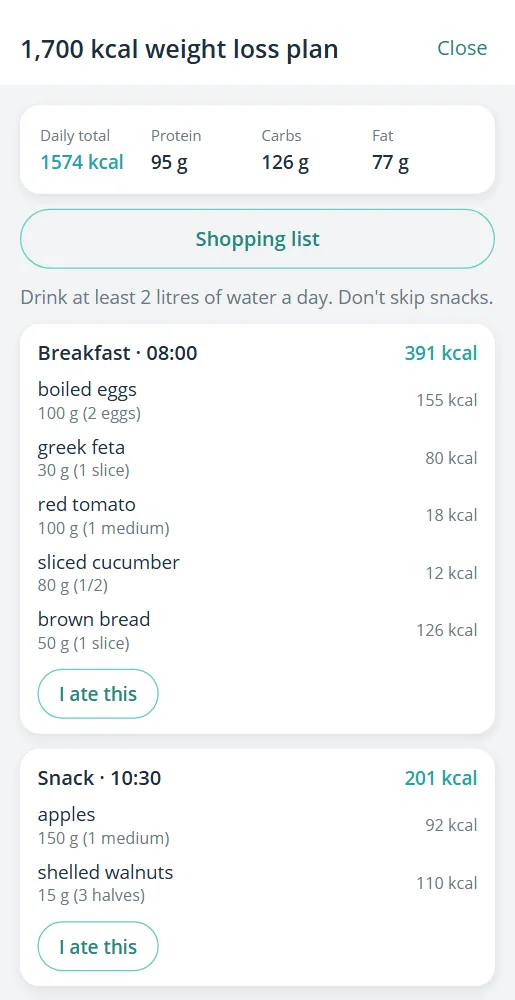
The meal plan and recipes you publish are on the client's phone along with the shopping list; the client logs a planned meal with one tap on “I ate this”. They see upcoming appointments, add them to their phone's calendar and reply “I'll be there” or “I can't make it”. They message you inside the app and fill in the forms you send on their phone; your new messages, plans, forms and meal notes arrive as notifications. On the appointments screen they also open the session notes and files, such as PDFs and images, that their dietitian has shared. With a calendar subscription, appointments also appear in the phone's calendar, and changes update automatically. If a form has a consent question, the client consents by typing their name. In the meal plan, each meal's time, items and notes are shown; tapping an item with a recipe opens the recipe's ingredients and method. The shopping list gathers all the items in the plan into a single list.
- Meal plan, recipes and shopping list
- Appointment replies and adding to the calendar
- In-app messaging and forms
- Instant notifications
Every meal in your panel instantly
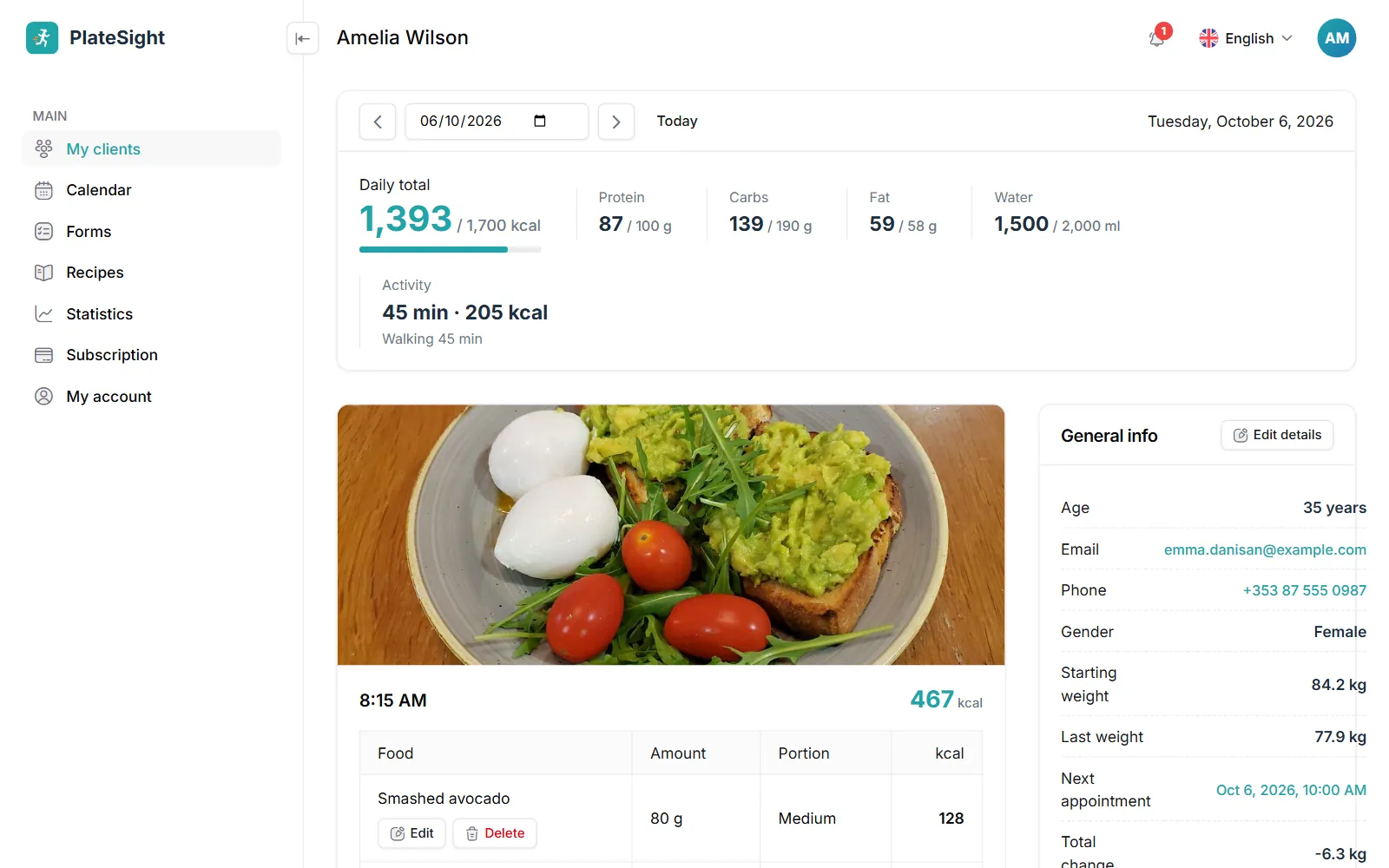
Every meal the client logs reaches your panel at the same moment, with its photo. You see meals, totals and progress against the goal day by day, correct the estimate and leave a note on the meal; your note reaches the client as a notification. For all the features of the panel, see our dietitian software page. For a client who should not see calorie and macro numbers, you can hide them in the app; the client still takes photos, and you see everything in the panel. The client can delete their personal account from within the app. When a client sends a message, an unread-message mark appears on your client list; the reply you write in the panel reaches the client's phone as a notification. Answers to forms are also stored in the client file. So you follow your client's day with a short look each day, without waiting for the next session.
- Meal photos in the panel, day by day
- Correct the estimate and leave a note on the meal
- Clients who stopped logging on the “Needs attention” card
- A daily summary e-mail every morning
Pricing
Free plan
3 clients, all features
Coming soonStandard plan
Up to 10 active clients
Coming soonPro plan
Up to 50 active clients
Coming soon


Frequently asked questions
How does my client start using the dietitian app?
When you add a client to the panel, they are given an 8-digit invitation code. Your client installs the app on their phone, enters the code and starts straight away as your client; no password is needed. If your client changes phone, they sign in again with the same code.
Do clients pay for the app?
No. Your clients use the app free of charge; the subscription is only for the dietitian account. There are no payments for the client to make inside the app.
Which phones does it work on?
The PlateSight app works on iPhone and Android phones. The app opens in the phone's language and works in any of 33 languages from across Europe.
Can the client use the app in their own language?
Yes. The app works in 33 languages from across Europe and opens in the phone's language; food names come in the client's language too.
Can someone without a dietitian use it?
Yes. The app can also be used on its own for personal calorie tracking; a certain number of photo analyses are free every day. Someone who later starts working with a dietitian moves their records to the dietitian with their consent. Details are on the personal use page.
How accurate are the calorie values?
The values are AI estimates and may differ from the real values; both the client and you can correct them. PlateSight is not a medical device. As the dietitian, you see every meal in the panel and correct items when needed.
Related pages and guide articles
With your permission, we use Google Analytics cookies to collect visit statistics that help us improve our website. We do not use advertising cookies. Cookie policy